ZFS expansion significantly increases the complexity of recovery.
For practical purposes, I recommend avoiding single expansions and never expanding your vdevs more than once.
Verify that you have a valid backup, destroy the pool, create a new pool configured as you need it, and restore from the backup.
Initial configuration
Let's take for example a configuration of 4 3-wide RAIDZ1 vdevs, arranged over three disk shelves as follows
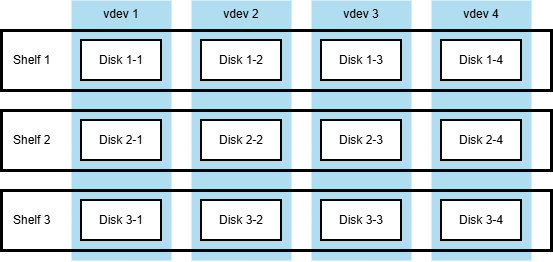 The original setup with three disk shelves hosting 4x 3-wide RAIDZ1 vdevs.
Similar configurations are often used because they survive failure of any single shelf in its entirety.
The system then operates as a set of 4 single-degraded vdevs.
Normally, more disks and more shelves are used, but the smaller example provides clearer illustration.
The worst case scenario, as usual, is loss of any and all disk labels. If this happens, recovery requires
- determining the number of vdevs and their corresponding widths (were there 4x 3-wide RAIDZ1 or 3x 4-wide RAIDZ2?)
- determining which disk is in what column of what vdev
This, while not exactly easy, is a perfectly solvable problem.
First expansion
Now let's say we add one more disk shelf and expand the original 3-wide to 4-wide RAIDZ1 vdevs. The configuration thus becomes
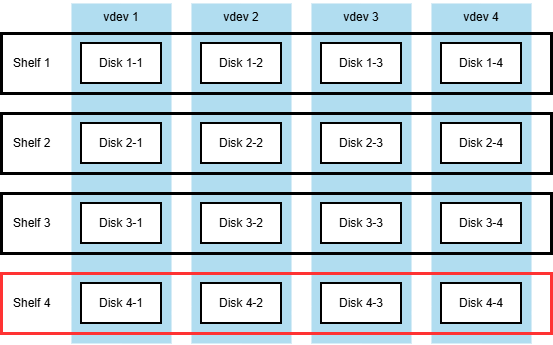 The setup after the first expansion, with four disk shelves hosting 4x 4-wide RAIDZ1 vdevs.
I did some experiments that suggest that ZFS does not copy what it considers to be free space during the expansion.
I never checked the source code, and I think it is an implementation detail anyway, subject to change,
but on the surface it sounds reasonable.
So after the expansion, each vdev has three valid layouts:
- The new 4-wide layout, used for all the newly written data.
- The expanded 3-to-4 layout, used for data that was present before the expansion.
- The original 3-wide layout, used for data that was deleted before the expansion, but not overwritten.
Now the recovery requires to determine two widths for each vdev and then place disks in two distinct layouts for each vdev,
and then take into account the intermediate 3-to-4 layout.
Second expansion, with a failure thrown in
If there is one more expansion,
resulting in 4x 5-wide RAIDZ1 vdevs, the complexity increases once more,
to five distinct layouts per vdev.
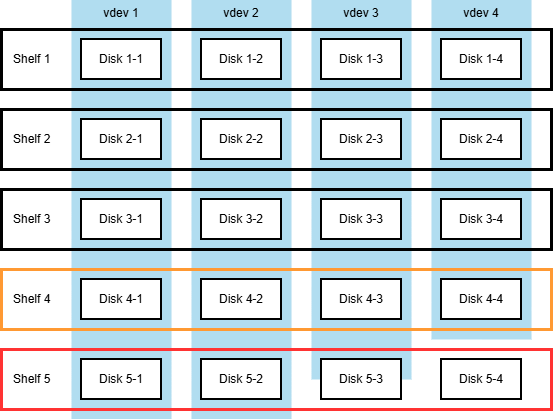 The setup after the failed second expansion, with five disk shelves hosting a mixed-width set of RAIDZ1 vdevs.
- The new 5-wide layout, used for all the newly written data.
- The expanded 4-to-5 layout, used for data that was present before the second expansion.
- The original 4-wide layout, used for data that was deleted before the second expansion, but not overwritten.
- The expanded 3-to-4-to-5 layout from the previous expansion.
- The original 3-wide layout from the original configuration, before the first expansion.
All of this, while still solvable, increases the computational effort required to produce more and more of the layout sets.
Furthermore, since there is no reliable record of which data block is stored using what layout,
each read has the additional requirement to try every block against every available layout
before declaring the block unreadable.
Caching alleviates the performance degradation to some extent, but it is still bad.
Interestingly, the failure mode where the system suffers some kind of catastrophe mid-expansion does not introduce more complexity.
Even if the exact point to which expansion progressed by the time of crash is not known,
the end result is the same mix of pre- and post-expansion layouts with no distinct separation point.
Conclusion
Expanded ZFS pools are recoverable. However, if you can re-create the pool from scratch and restore from backup,
it is a better option.
Filed under: ZFS.
Created
This text is licensed under Creative Commons Attribution 4.0 License