NVMe information view
NVMe information is similar to well-known S.M.A.R.T. information provided by hard drives and SATA SSDs.
It provides insight into the health and possible problems with an NVMe storage device.
However, it is tailored to the properties of flash-based storage, covering NAND memory issues
instead of mechanical problems of a rotational hard drive.
There are two sections of NVMe information page - attributes and logs.
You can switch between them using the corresponding toolbar buttons.
Attributes view
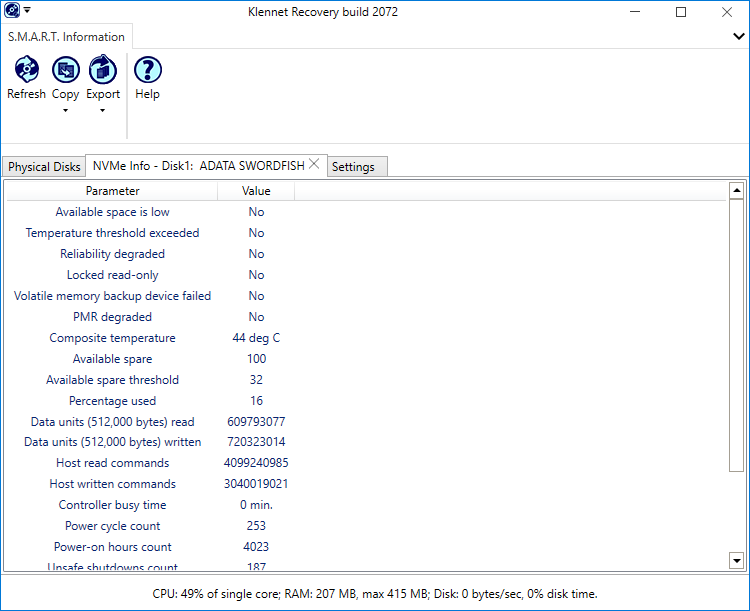 Example NVMe attributes display.
The attribute list starts with the critical parameters.
If any of these is bad, make an image file of the device immediately.
The parameters are:
-
Available space is low - the device is full of bad blocks, there is (almost) no reserve space left to remap them.
-
Temperature threshold exceeded - at some point in the past, the overheating was so bad that NAND memory may have been damaged.
-
Reliability degraded - this is a general indication of some significant problem with the NAND memory.
-
Locked read-only - the NAND memory is worn out to the point the device locked itself in read-only mode.
There is no write endurance left at all.
Technically, you don't need write endurance while doing read-only recovery,
but it is an overall indication of the bad state of the NAND memory.
-
Volatile memory backup device failed -
the power backup for write cache DRAM on the device failed.
Again, we don't write to the device during recovery, so it may seem irrelevant.
However, the flash-based devices do their own internal maintenance even if we do not explicitly write to them.
Without the power backup, there may be additional data loss should a power fail during the recovery.
-
PMR degraded -
PMR
(Persistent Memory Region)
is an optional feature of NVMe devices, not often used in the consumer space.
However, if it is flagged bad, it's bad - there is some problem with either NAND or the controller.
Other items in the attribute list include:
-
Media errors count should normally be zero.
Small values are acceptable, but keep an eye out that it does not increase.
- Thermal management entries
-
Critical composite temperature time.
You don't want any of that, but there is not much you can do about it if you have it already.
If you got some, make an image file of the device, it is literally fried.
- Warning composite temperature time is not that bad.
It shows for how long the device was throttling to prevent overheating into the "critical" temperatures.
You can ignore it.
-
Available spare and Available spare threshold by themselves are irrelevant.
These are related to the remaining write endurance, but we are not writing to the device.
If the things are very bad, the critical Available space low (see above) is triggered,
and then you need to image the device.
Logs view
Self-test log
This is the history of self-tests run on the device.
If there are any failures, the device NAND has bad areas.
Make an image of the device if you see these.
Error log
Shows the most recent command errors reported by the controller, in raw form.
However, on certain controller/firmware combinations, there are thousands of spurious entries logged.
Absent any other problem indications, disregard the error log.