Klennet Recovery includes a scan depth limiter for ZFS pools.
This setting is on the Settings page, in the ZFS section.
Background - ZFS transactions
A ZFS pool records every change as a transaction.
Each transaction creates a new version of the filesystem.
Each transaction has a unique number, and numbers are continuously increasing.
This number, or the transaction itself, is often called TXG number, or TXG.
A higher TXG number means a more recent (newer) transaction.
The TXG numbers do not map to wall-clock time.
When idle, ZFS writes one transaction about every 5 seconds.
Under load, you can expect about one transaction per second.
Thus, any conversions of TXG numbers to actual time are rather approximate.
The approximations are as follows
Approximate relationship between depth limiter setting and wall clock time.
| Limit |
Time under load |
Time when idle |
| 100K transactions |
about 1 day |
about 5 days |
| 1M transactions |
about 10 days |
about two months |
Every time ZFS pool is created, its transaction number counter is reset.
A new, empty pool typically starts at TXG 4 (the first three transactions are used during the pool creation).
Klennet Recovery pool analysis order
Klennet Recovery first scans the disks for metadata objects.
It sorts the objects by TXG number, then processes them from the highest TXG number to the lowest.
So, the scan moves from the newest data to the oldest.
A pool can hold several million discoverable metadata objects.
Older objects have a lower chance of recovery than newer ones, because
as the disk space is reused over time,
older objects have a higher chance of being overwritten.
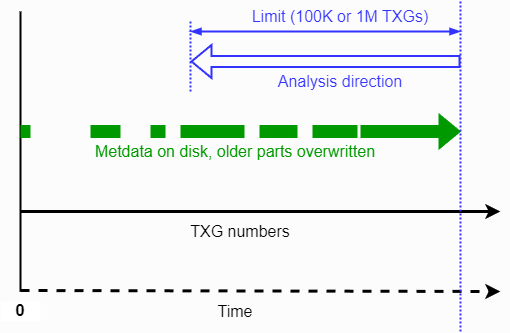 ZFS transactions, analysis direction, and depth limiter function.
The scan depth limiter
The scan depth limiter sets a maximum number of transactions for Klennet Recovery to process. Available values are:
- 100K transactions
- 1M transactions
- No limit
For the purpose of the limiter,
there are three types of metadata objects: a MOS, an Object Set, and a ZVOL reference.
The limit applies per object type, not to the total object count.
At a setting of 100K, Klennet Recovery can process up to 300K objects in total: up to 100K from each of the three types.
When the limit is reached, Klennet Recovery stops processing and discards the remaining, older objects.
There is no indication when this happens or how many objects have been discovered.
The limiter provides a way to control the trade-off between analysis speed and reach into the past:
- A lower limit reduces scan time and memory use.
- A higher limit lets Klennet Recovery reach older data.
This matters when, for example, a file deletion is discovered long after it happened.
Processing time increases in linear proportion to the number of objects processed.
Memory use increases less than linearly, close to the square root of the object count.
Special case: an overwritten pool
A common recovery case involves a pool that is overwritten with a new, blank pool, either by mistake or through malicious activity.
Because every new pool resets the TXG counter, the new pool starts again at TXG 4.
Typically, the problem is discovered quickly and the new pool accumulates only a few transactions before recovery starts.
In this case, a 100K setting works well.
Klennet Recovery starts at the highest TXG number found on the disk and works backwards.
Because the new pool has so few transactions, the reverse-direction scan does not even reach the new blank pool.
Only the old pool metadata is processed, which is what you need to recover.
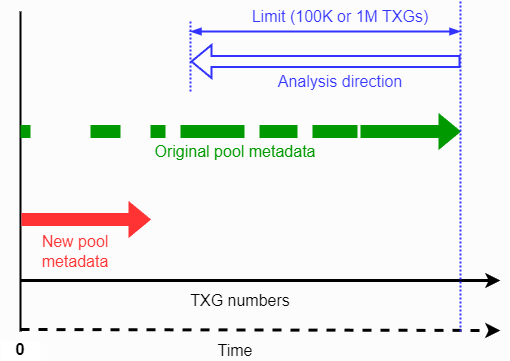 ZFS transactions relationship between the overwritten pool and the new pool.
Summary
- Use a lower limit (100K) for recent incidents, and for the common case of a pool quickly overwritten by a new, blank pool.
- Use a higher limit (1M) or no limit for older incidents, where the target data sits far back in the transaction history.
- Remember that a higher limit costs more scan time and requires more RAM to process.